Showcase
Advanced Channel Layer Patterns and External Integrations
In this final section, we’ll demonstrate advanced Fast Channels patterns by creating a comprehensive showcase that combines multiple channel layer types, different consumer implementations, and external script integrations. This showcases the full power and flexibility of Fast Channels for complex real-time applications.
Understanding Advanced Channel Layer Patterns
- Multiple Layer TypesDifferent types of communication require different channel layer configurations:
Chat Layer: Fast pub/sub for real-time chat messaging
Queue Layer: Reliable message delivery with persistence
Notifications Layer: Ephemeral notifications that don’t need persistence
Analytics Layer: High-throughput event processing with reliability
- Consumer Type VariationsFast Channels provides different consumer base classes:
AsyncWebsocketConsumer: Basic WebSocket handling with text/binary data
AsyncJsonWebsocketConsumer: Automatic JSON encoding/decoding for structured data
AsyncConsumer: Low-level consumer for custom protocols
- External Script IntegrationChannel layers enable communication from outside the WebSocket server:
Background services sending notifications
Analytics processors publishing events
System maintenance scripts broadcasting announcements
Monitoring tools sending alerts
What We’re Building
A comprehensive showcase application featuring:
Multiple Consumer Types: Different consumers using different channel layers
JSON vs Text Messaging: Comparison between AsyncWebsocketConsumer and AsyncJsonWebsocketConsumer
Layer-Specific Behaviors: Demonstrating pub/sub vs queue-based messaging
External Script Integration: Scripts sending messages from outside the web application
Real-time Multi-layer Communication: Messages flowing through different layers simultaneously
Creating the Showcase Module
First, let’s create the showcase module structure:
# Create the showcase module directory
mkdir -p sandbox/apps/showcase

# Create __init__.py file to make it a Python module
touch sandbox/apps/showcase/__init__.py
Your apps structure should now look like this:
sandbox/apps/
├── __init__.py
├── background_jobs/
│   ├── __init__.py
│   └── consumer.py
├── room_chat/
│   ├── __init__.py
│   └── consumer.py
├── showcase/
│   └── __init__.py
└── system_chat/
    ├── __init__.py
    └── consumer.py
Creating the Showcase Consumers
Now let’s create our showcase consumers that demonstrate different patterns. Create a new file at sandbox/apps/showcase/consumer.py:
Showcase Consumers Code
"""
Showcase Consumers Template

This template demonstrates multiple channel layer types working together.
Shows different layer configurations and use cases.

TODO:
1. Configure your channel layer aliases in layers.py
2. Customize group names and message types
3. Add your own consumer types as needed
"""

from fast_channels.consumer.websocket import (
    AsyncJsonWebsocketConsumer,
    AsyncWebsocketConsumer,
)


class ChatConsumer(AsyncWebsocketConsumer):
    """
    Basic chat consumer using the centralized chat layer.
    """

    groups = ["chat_room"]
    channel_layer_alias = "chat"  # TODO: Configure in your layers.py

    async def connect(self):
        await self.accept()
        # TODO: Customize join message
        await self.channel_layer.group_send(
            "chat_room",
            {"type": "chat_message", "message": "📢 Someone joined the chat"},
        )

    async def disconnect(self, code):
        await super().disconnect(code)
        # TODO: Customize leave message
        await self.channel_layer.group_send(
            "chat_room",
            {"type": "chat_message", "message": "❌ Someone left the chat."},
        )

    async def receive(self, text_data=None, bytes_data=None, **kwargs):
        # TODO: Add message processing logic
        await self.channel_layer.group_send(
            "chat_room", {"type": "chat_message", "message": f"💬 {text_data}"}
        )

    async def chat_message(self, event):
        """Called when someone has messaged our chat."""
        await self.send(event["message"])


class ReliableChatConsumer(AsyncWebsocketConsumer):
    """
    Chat consumer using queue-based layer for guaranteed message delivery.
    """

    channel_layer_alias = "queue"  # TODO: Configure in your layers.py
    groups = ["reliable_chat"]

    async def connect(self):
        await self.accept()
        # TODO: Customize connection message
        await self.channel_layer.group_send(
            "reliable_chat",
            {
                "type": "reliable_chat_message",
                "message": "🔒 Reliable chat connection established!",
            },
        )

    async def receive(self, text_data=None, bytes_data=None, **kwargs):
        # TODO: Add reliable message processing
        await self.channel_layer.group_send(
            "reliable_chat",
            {"type": "reliable_chat_message", "message": f"📨 {text_data}"},
        )

    async def disconnect(self, close_code):
        # TODO: Add disconnect handling
        await self.channel_layer.group_send(
            "reliable_chat",
            {"type": "reliable_chat_message", "message": "🚪 Left reliable chat!"},
        )

    async def reliable_chat_message(self, event):
        """Called when someone has messaged our reliable chat."""
        await self.send(event["message"])


class NotificationConsumer(AsyncJsonWebsocketConsumer):
    """
    Consumer for real-time notifications using JSON messages.
    """

    channel_layer_alias = "notifications"  # TODO: Configure in your layers.py
    groups = ["notifications"]

    async def connect(self):
        await self.accept()
        # TODO: Customize notification connection message
        await self.channel_layer.group_send(
            "notifications",
            {
                "type": "notification_message",
                "data": {"type": "system", "message": "🔔 Connected to notifications!"},
            },
        )

    async def receive_json(self, content, **kwargs):
        # TODO: Add JSON notification processing logic
        await self.channel_layer.group_send(
            "notifications",
            {
                "type": "notification_message",
                "data": {
                    "type": "user",
                    "message": (
                        f"🔔 Notification: {content.get('message', 'No message')}"
                    ),
                },
            },
        )

    async def disconnect(self, close_code):
        # TODO: Add notification disconnect handling if needed
        pass

    async def notification_message(self, event):
        """Called when a notification is sent to the group."""
        await self.send_json(event["data"])


# TODO: Implement the AnalyticsConsumer class below
# Hints:
# 1. Use channel_layer_alias = "analytics"
# 2. Use groups = ["analytics"]
# 3. Create analytics_message method to handle events
# 4. Consider JSON message format for structured analytics data
# 5. Process analytics events and send them to the group
# 6. Handle connection/disconnection as needed for your use case


class AnalyticsConsumer(AsyncWebsocketConsumer):
    """
    TODO: Consumer for analytics events with reliable delivery.

    Implement this consumer by:
    1. Setting up the proper channel layer alias and groups
    2. Handling connection, receive, and disconnect methods
    3. Creating an analytics_message method for group events
    4. Processing analytics events appropriately
    """

    # TODO: Add your implementation here
    pass
Understanding the Showcase Consumers
Let’s examine the different patterns demonstrated:
- ChatConsumer (AsyncWebsocketConsumer):
Uses “chat” layer (Redis pub/sub)
Text-based messaging with
receive(text_data)Fast, ephemeral communication
Auto-joins “chat_room” group via
groupsattribute
- ReliableChatConsumer (AsyncWebsocketConsumer):
Uses “queue” layer (Redis queue-based)
Guaranteed message delivery with persistence
Manual group management in connect/disconnect
Ideal for critical communications
- NotificationConsumer (AsyncJsonWebsocketConsumer):
Uses “notifications” layer
JSON-based messaging with
receive_json(content)andsend_json(data)Structured data with type information
Automatic JSON encoding/decoding
- AnalyticsConsumer (Your Implementation):
Uses “analytics” layer for high-throughput events
Exercise for you to implement based on the TODO hints
Should handle analytics events and metrics
Creating the External Script
First, let’s create an external script that demonstrates sending messages to WebSocket clients from outside the web application. This will show you what kinds of analytics events you’ll need to handle. Create the file sandbox/external_sender.py:
External Script Code
"""
Example of sending messages to WebSocket groups from outside a consumer,
using centralized layer configuration from layers.py.
"""

import asyncio

from fast_channels.layers import get_channel_layer

from sandbox.layers import setup_layers

setup_layers()

chat_layer = get_channel_layer("chat")
queue_layer = get_channel_layer("queue")
notifications_layer = get_channel_layer("notifications")
analytics_layer = get_channel_layer("analytics")


async def send_chat_message():
    """
    Send a message to the chat room using the chat layer.
    """
    if not chat_layer:
        print("❌ No chat layer available!")
        return

    await chat_layer.group_send(
        "chat_room",
        {
            "type": "chat_message",
            "message": "🔔 System announcement: Welcome to the chat!",
        },
    )

    print("✅ Chat message sent!")


async def send_reliable_message():
    """
    Send a message using the queue-based layer for guaranteed delivery.
    """
    if not queue_layer:
        print("❌ No queue layer available!")
        return

    await queue_layer.group_send(
        "reliable_chat",
        {
            "type": "reliable_chat_message",
            "message": "🔒 Important: System maintenance scheduled for tonight",
        },
    )

    print("✅ Reliable message sent!")


async def send_notification():
    """
    Send a notification using the notifications layer.
    """
    if not notifications_layer:
        print("❌ No notifications layer available!")
        return

    await notifications_layer.group_send(
        "notifications",
        {
            "type": "notification_message",
            "data": {
                "type": "system",
                "message": "🚨 Alert: High CPU usage detected on server",
            },
        },
    )

    print("✅ Notification sent!")


async def send_analytics_event():
    """
    Send analytics events using the analytics layer.
    """
    if not analytics_layer:
        print("❌ No analytics layer available!")
        return

    # Send multiple analytics events
    events = [
        "user_login:john_doe",
        "page_view:/dashboard",
        "button_click:export_data",
        "session_duration:1234",
        "error:api_timeout",
    ]

    for event in events:
        await analytics_layer.group_send(
            "analytics", {"type": "analytics_message", "message": f"📊 Event: {event}"}
        )
        await asyncio.sleep(0.1)  # Small delay between events

    print(f"✅ Sent {len(events)} analytics events!")


async def send_to_multiple_layers():
    """
    Demonstrate sending to different layers for different purposes.
    """
    print("🚀 Broadcasting to multiple layers...")

    # Send to chat (fast pub/sub)
    await chat_layer.group_send(
        "chat_room",
        {
            "type": "chat_message",
            "message": "💬 Multi-layer broadcast: Chat message",
        },
    )

    # Send to notifications (ephemeral)
    await notifications_layer.group_send(
        "notifications",
        {
            "type": "notification_message",
            "data": {
                "type": "broadcast",
                "message": "🔔 Multi-layer broadcast: Notification",
            },
        },
    )

    # Send to queue (reliable)
    await queue_layer.group_send(
        "reliable_chat",
        {
            "type": "reliable_chat_message",
            "message": "📨 Multi-layer broadcast: Reliable message",
        },
    )

    print("✅ Multi-layer broadcast complete!")


async def periodic_announcements():
    """
    Send periodic announcements to different channels.
    """
    print("⏰ Starting periodic announcements...")

    for i in range(3):
        # Alternate between different layers
        if i % 2 == 0:
            layer = chat_layer
            group = "chat_room"
            message = f"⏰ Hourly chat announcement #{i+1}"
        else:
            layer = notifications_layer
            group = "notifications"
            message = f"🔔 System status update #{i+1}"

        if layer:
            if group == "chat_room":
                await layer.group_send(
                    group, {"type": "chat_message", "message": message}
                )
            else:  # notifications
                await layer.group_send(
                    group,
                    {
                        "type": "notification_message",
                        "data": {"type": "periodic", "message": message},
                    },
                )
            print(f"✅ Sent announcement #{i+1}")

        await asyncio.sleep(1)  # 1 second between announcements

    print("✅ Periodic announcements complete!")


async def main():
    """
    Run all external messaging examples.
    """
    print("=== External Messaging with Centralized Layers ===\n")

    # Import layers module to trigger setup

    examples = [
        ("Chat Message", send_chat_message),
        ("Reliable Message", send_reliable_message),
        ("Notification", send_notification),
        ("Analytics Events", send_analytics_event),
        ("Multi-layer Broadcast", send_to_multiple_layers),
        ("Periodic Announcements", periodic_announcements),
    ]

    for name, func in examples:
        print(f"🎯 Running: {name}")
        try:
            await func()
        except Exception as e:
            print(f"❌ Error in {name}: {e}")
        print()  # Add spacing between examples
        await asyncio.sleep(0.5)  # Brief pause between examples

    print("=== All Examples Complete! ===")


if __name__ == "__main__":
    asyncio.run(main())
This external script demonstrates:
Multi-layer Communication: Sends messages through different channel layers
External Integration: Shows how background services can communicate with WebSocket clients
Layer-specific Messaging: Different message types for different purposes
Periodic Operations: Automated announcements and system notifications
Notice the send_analytics_event() function that sends various analytics events like “user_login”, “page_view”, “button_click”, etc. This gives you a good idea of what your AnalyticsConsumer should handle.
Implementing the AnalyticsConsumer
Now that you’ve seen what kinds of analytics events the external script sends, try implementing the AnalyticsConsumer yourself based on the TODO hints in the template. Here’s the complete code for you to compare and reference:
AnalyticsConsumer Implementation
class AnalyticsConsumer(AsyncWebsocketConsumer):
    """
    Consumer for analytics events with reliable delivery.
    """

    channel_layer_alias = "analytics"
    groups = ["analytics"]

    async def connect(self):
        await self.accept()
        # Send connection confirmation
        await self.channel_layer.group_send(
            "analytics",
            {
                "type": "analytics_message",
                "message": "📊 Analytics tracking started!"
            },
        )

    async def receive(self, text_data=None, bytes_data=None, **kwargs):
        # Process analytics event
        await self.channel_layer.group_send(
            "analytics",
            {
                "type": "analytics_message",
                "message": f"📊 Analytics: {text_data}"
            },
        )

    async def disconnect(self, close_code):
        # Optional: Send disconnect analytics
        pass

    async def analytics_message(self, event):
        """Called when an analytics event is sent to the group."""
        await self.send(event["message"])
Integrating the Showcase Consumers
Connect all showcase consumers to your FastAPI application. Open sandbox/main.py and uncomment these lines:
# Uncomment these import lines:
from sandbox.apps.showcase.consumer import (
    AnalyticsConsumer,
    ChatConsumer,
    NotificationConsumer,
    ReliableChatConsumer,
)

# Uncomment these WebSocket routes:
ws_router.add_websocket_route("/chat", ChatConsumer.as_asgi())
ws_router.add_websocket_route("/reliable", ReliableChatConsumer.as_asgi())
ws_router.add_websocket_route("/notifications", NotificationConsumer.as_asgi())
ws_router.add_websocket_route("/analytics", AnalyticsConsumer.as_asgi())
These routes create WebSocket endpoints for each showcase consumer type.
Testing the Showcase
Your final project structure should now look like this:
tutorial-project/
├── docker-compose.yml
└── sandbox/
    ├── __init__.py
    ├── main.py
    ├── layers.py
    ├── tasks.py
    ├── worker.py
    ├── start_dev.py
    ├── external_sender.py
    ├── apps/
    │   ├── __init__.py
    │   ├── background_jobs/
    │   │   ├── __init__.py
    │   │   └── consumer.py
    │   ├── room_chat/
    │   │   ├── __init__.py
    │   │   └── consumer.py
    │   ├── showcase/
    │   │   ├── __init__.py
    │   │   └── consumer.py
    │   └── system_chat/
    │       ├── __init__.py
    │       └── consumer.py
    └── static/
        ├── css/
        │   └── style.css
        └── js/
            └── main.js
Stop any running servers:
If you have a server running, stop it first (Ctrl+C) to avoid conflicts.
Start the development environment:
# Use the development launcher
python sandbox/start_dev.py
Test the showcase features:
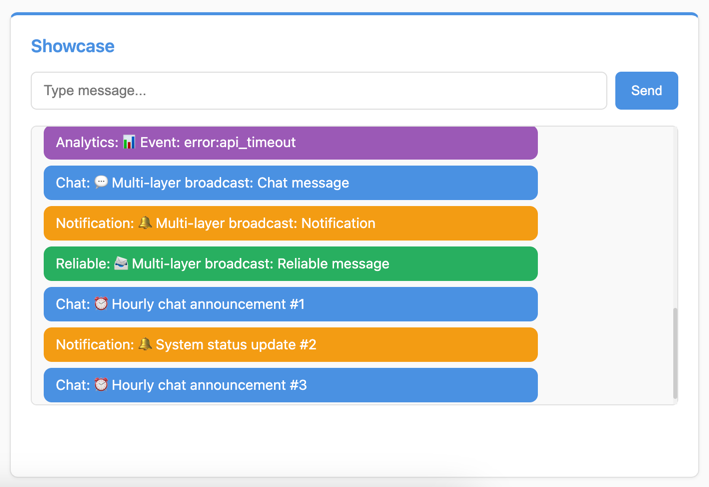
Visit http://localhost:8080 in your browser. You should see the “Showcase” section.
Try these interactions to see different layer behaviors:
Type in the Showcase section and press “Send” - You’ll receive messages back through both chat and reliable chat layers
Run the external script in a separate terminal:
python -m sandbox.external_sender- You’ll see messages appear in real-time from the external script
- Expected Behavior:
Messages flow through different channel layers simultaneously
JSON notifications have structured data format
External script sends messages that appear in real-time
Different layers show different messaging patterns
Customizing the Showcase
1. Adding Custom Layer Types:
# In sandbox/layers.py, add new layer configurations:
"monitoring": {
    "layer": RedisPubSubChannelLayer(hosts=[redis_url], prefix="monitor"),
    "description": "Real-time monitoring layer",
},
2. Creating Custom JSON Consumers:
class CustomJsonConsumer(AsyncJsonWebsocketConsumer):
    async def receive_json(self, content, **kwargs):
        # Handle structured data
        message_type = content.get("type")
        payload = content.get("payload")

        if message_type == "user_action":
            await self.handle_user_action(payload)
        elif message_type == "system_event":
            await self.handle_system_event(payload)
3. Advanced External Scripts:
# Create monitoring script
async def send_monitoring_alert():
    layer = get_channel_layer("monitoring")
    await layer.group_send(
        "alerts",
        {
            "type": "alert_message",
            "data": {
                "severity": "high",
                "message": "CPU usage above 90%",
                "timestamp": time.time()
            }
        }
    )
4. Cross-Layer Communication:
async def broadcast_to_all_layers(message):
    """Send message to multiple layer types simultaneously."""
    layers = ["chat", "notifications", "analytics"]

    for layer_name in layers:
        layer = get_channel_layer(layer_name)
        if layer:
            await layer.group_send(
                f"{layer_name}_group",
                {"type": f"{layer_name}_message", "message": message}
            )
Troubleshooting
- External Script Not Working:
Ensure Redis is running and channel layers are set up:
docker compose ps- JSON Messages Not Parsing:
Check that you’re sending valid JSON to AsyncJsonWebsocketConsumer endpoints
- Messages Not Appearing:
Verify all imports and routes are uncommented in
sandbox/main.py- Layer Connection Issues:
Ensure
setup_layers()is called before any channel layer operations- External Script Import Errors:
Make sure you’re running the script from the project root directory
What You’ve Accomplished
Congratulations! You’ve now mastered Fast Channels and built a comprehensive real-time application. You understand:
✅ Multiple Channel Layer Types: Pub/sub, queue-based, and specialized layers
✅ Advanced Consumer Patterns: Text vs JSON consumers and their use cases
✅ External Script Integration: Sending messages from outside the web application
✅ Cross-Process Communication: Coordinating between different services and scripts
✅ Production-Ready Patterns: Scalable architectures using different layer types
✅ Real-time Application Development: Complete workflow from simple echo to complex multi-layer systems
References
- Learning Resources:
Explore the complete /sandbox code for more examples
Read the Fast Channels documentation for advanced configuration options
Study Django Channels patterns that inspired Fast Channels design
Thank you for completing the Fast Channels tutorial! You’re now ready to build powerful, scalable real-time applications with confidence.