Tutorial
Building a Real-Time WebSocket Application
Welcome to the Fast Channels tutorial! In this hands-on guide, you’ll build a complete real-time WebSocket application that demonstrates all the key features of Fast Channels.
What You’ll Build
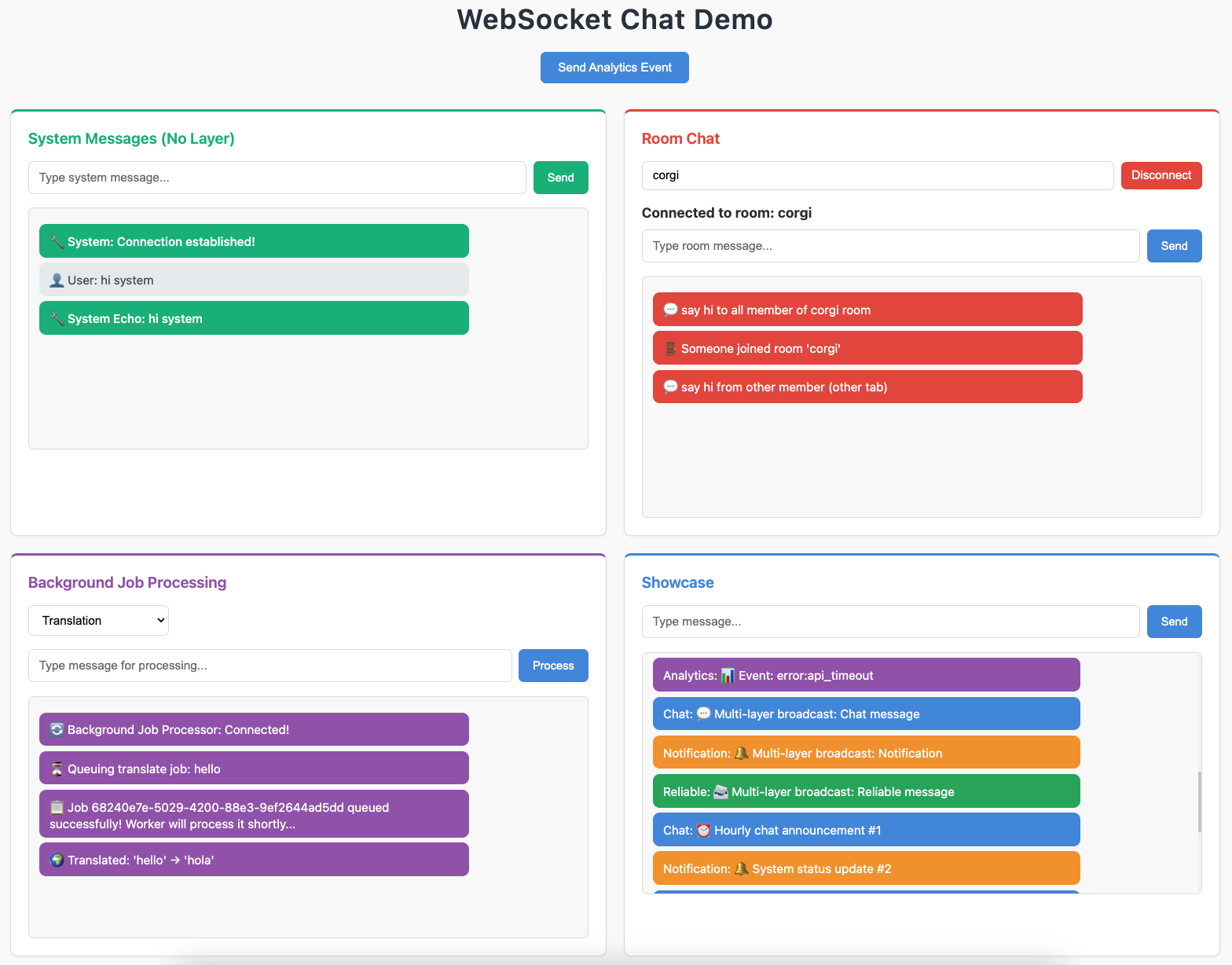
By the end of this tutorial, you’ll have created a WebSocket chat demo application with multiple features:
System Messages - Simple echo WebSocket without channel layers
Room Chat - Multi-room chat where users can join specific rooms
Background Job Processing - Send tasks to background workers and receive results in real-time
Showcase - Advanced channel layer patterns and external integrations
The final application showcases the power of Fast Channels for building scalable, real-time applications with multiple communication patterns.
Two Ways to Follow This Tutorial
Option 1: Explore the Complete Example (Quick Review)
Clone the Fast Channels repository and run the working sandbox:
# Clone the repository
git clone https://github.com/huynguyengl99/fast-channels.git
cd fast-channels

# Install dependencies with uv (recommended)
uv sync --all-extras

# Activate the virtual environment
source .venv/bin/activate  # On Windows: .venv\Scripts\activate

# Start Redis and other services
docker compose up -d

# Run the sandbox application
python sandbox/start_dev.py
Then visit http://localhost:8080 to see the complete application in action.
You can explore the code in the /sandbox directory to see how each feature is implemented.
Option 2: Build From Scratch (Recommended)
Follow the step-by-step tutorial sections to build the application yourself and learn each concept thoroughly:
Tutorial Structure
Each section builds upon the previous one:
Preparation - Set up your development environment and basic FastAPI app
System Messages - Create your first WebSocket consumer without channel layers
Room Chat - Add channel layers and group messaging for multi-room chat
Background Jobs - Integrate background task processing with real-time updates
Layer Combinations - Use multiple channel layer types and external scripts
Prerequisites
Before starting, you should have:
Python 3.11+ installed
Basic familiarity with FastAPI or Starlette
Understanding of async/await in Python
Docker installed (for Redis)
If you’re new to these technologies, we recommend reading the Core Concepts guide first.
Development Tools
This tutorial uses modern Python development tools:
uv - Fast Python package manager (recommended, but pip works too)
Docker Compose - For running Redis locally
FastAPI - ASGI web framework
Redis - Channel layer backend for production features
Ready to Start?
Choose your path:
Quick Start: Use Option 1 to explore the complete working example
Deep Dive: Use Option 2 to build everything step-by-step
Either way, you’ll learn how to leverage Fast Channels to build powerful real-time applications!
Let’s begin with Preparation to set up your development environment.